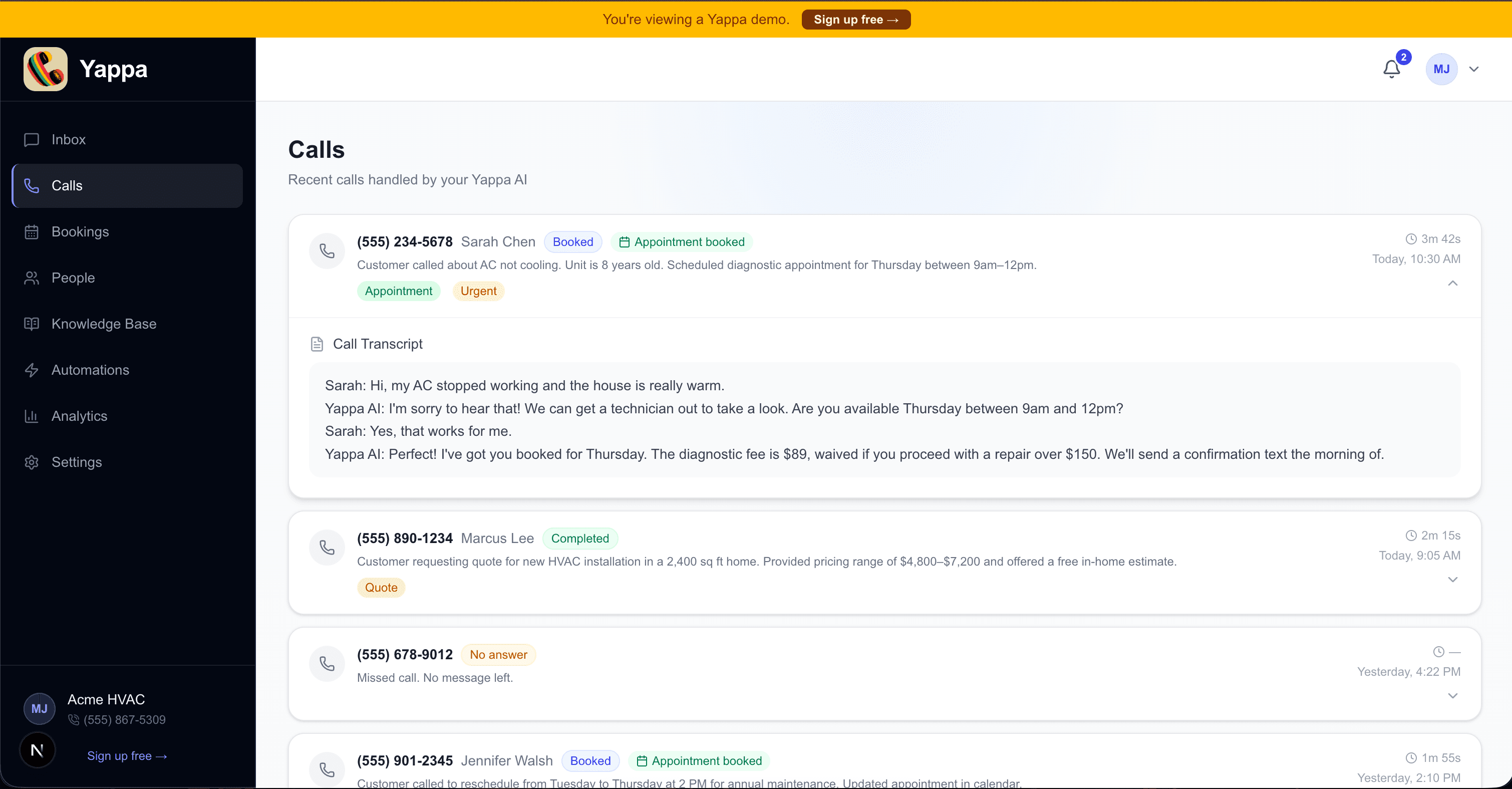
One of the most common questions we hear from business owners is simple: "What does it actually look like?" You can read feature lists and watch explainer videos, but nothing replaces just seeing the thing. So we built a live demo you can explore right now — no login, no credit card, no commitment.
The demo is a realistic preview of what your Yappa dashboard looks like in practice. We loaded it with sample data for a fictional HVAC company so every section feels real, not empty. Here's what you'll find inside.
Calls — Your AI receptionist's paper trail
Every call your Yappa AI handles shows up in the Calls tab as a searchable, filterable record. You can see who called, when, how long the call lasted, and what the AI gathered — a plain-English summary of why the customer called, whether an appointment was booked, and any tags like "urgent" or "quote request" that help your team triage quickly.
Tap any call to expand it and read the full transcript. For businesses on the Max plan, call recordings are available too (with proper consent disclosure built in). You're never flying blind on what the AI said or promised.
Bookings — Appointments without the back-and-forth
When your AI books an appointment during a call, it lands here automatically — customer name, phone, service type, date, time, and status. Connect Google Calendar or Outlook and those bookings sync to your existing calendar so nothing falls through the cracks.
People — Your growing customer list, built automatically
Every caller becomes a contact. Yappa tracks who's a new caller versus a returning customer, saves their preferred contact method, summarizes why they last called, and shows their next upcoming appointment. Over time, this becomes your CRM — built passively, without your team entering a single record manually.
Knowledge Base — Teach your AI about your business
The Knowledge Base is where you tell Yappa what to know. Add your hours, service area, pricing, policies, and FAQs. The AI uses this during calls to give accurate, confident answers instead of vague deflections. You can also use the built-in AI generator to draft entries from a plain description — type a few sentences about your business and it fills in the blanks.
Automations — Follow-up that happens without you
This is where Yappa goes from "answers calls" to "runs follow-up." Configure which events trigger which emails after the call completes: appointment confirmations, pre-appointment reminders, review requests after a job, payment link emails for quotes. Each workflow fires automatically when the right condition is met — no manual sending required.
Analytics — See how your AI is performing
The Analytics tab gives you a clear view of what's working: how many calls your AI handled, how many converted to appointments, your booking rate, and how many follow-up emails were sent after calls completed. It's designed to help you understand your front desk at a glance — not bury you in spreadsheets.
24/7
Call coverage — never miss an inquiry
~2 min
Average AI call duration for a new booking
0
Manual records to enter — Yappa logs it all
What the demo focuses on today
The current demo is centered on the launch experience: calls, bookings, people, automations, analytics, and the knowledge base. That's the part of Yappa you can evaluate today without needing a live account or setup help.
We kept the demo focused on the workflows that are available in the public release so what you see matches what you'll actually be testing in your own account.
Try the demo yourself
The best way to understand Yappa isn't to read about it — it's to click around. The demo runs on fake data for "Acme HVAC" so every section looks and behaves exactly like a real account. No signup required.
What growth-minded service businesses do differently
The biggest operational difference between service businesses that feel calm and ones that feel chaotic is not usually demand. It is how they handle demand when it shows up all at once. Calls, jobs, quotes, and urgent questions all compete for attention, and without a repeatable intake system, the owner becomes the bottleneck.
That is why responsiveness compounds. The business that answers clearly, gathers the right details, and gives a caller a concrete next step will usually look more trustworthy than the business with slightly better reviews but slower follow-through.
- Define what information every new inquiry should provide before the call ends.
- Separate urgent calls, quote requests, and routine questions with consistent rules.
- Review common objections so your call handling keeps improving over time.
- Treat call coverage as part of revenue operations, not just admin work.
Why AI voice is becoming a real operating tool
Good AI voice is not a gimmick phone tree. It is a conversational layer that can greet callers, collect structured details, answer common questions, and move the call toward a useful outcome without sounding robotic. For busy operators, the value is speed and consistency more than novelty.
What changes in practice is simple: callers get a response immediately, your team gets cleaner intake, and the business gets a more searchable record of what customers are asking for. That combination is what makes voice AI useful even for small teams that do not think of themselves as especially technical.
How Yappa turns this into a repeatable system
Yappa is built for inbound service-business calls, which means it is not trying to be a generic consumer assistant. It is configured around your services, hours, FAQs, intake questions, and routing rules so the conversation sounds relevant to the business the caller thought they were reaching.
Instead of letting demand pile up in voicemail, Yappa can answer instantly, capture the caller details your team actually needs, flag urgent situations, and log transcripts and outcomes inside the dashboard. That gives owners a more consistent front door and gives staff better context before the human handoff happens.
- Answer every inbound call with business-specific context instead of a generic recording.
- Collect structured intake so callers are not repeating themselves to multiple people.
- Surface urgent conversations quickly when a real person needs to step in.
- Keep call transcripts, recordings, and outcomes in one place for review and improvement.
See the Dashboard Live
Explore the full Yappa dashboard with sample data — calls, bookings, people, automations, analytics, and the knowledge base — before you sign up for anything.
View DemoWhen you're ready to set up your own account, every plan includes a 7-day free trial. Your AI receptionist can be live and answering calls within minutes of completing onboarding.